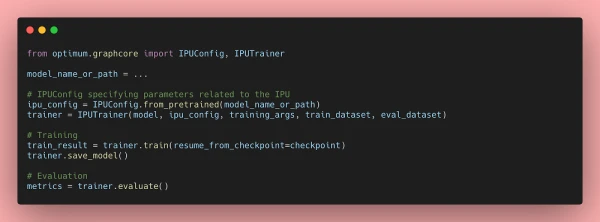
Transformer models have proven highly effective across a range of machine learning tasks, from natural language processing to computer vision. However, their large size can lead to slow prediction speeds, making them impractical for latency-sensitive applications. To address this, Hugging Face introduced Optimum, an open-source library that simplifies accelerating Transformer models on various hardware. This article focuses on using Optimum with Graphcore's Intelligence Processing Unit (IPU), a processor designed specifically for AI workloads.
Optimum Meets Graphcore IPU
Thanks to a partnership between Graphcore and Hugging Face, BERT is now the first IPU-optimized model. Graphcore engineers have leveraged Hugging Face Transformers to implement and optimize BERT for IPU systems, enabling developers to easily train, fine-tune, and accelerate state-of-the-art models. More IPU-optimized models for vision, speech, translation, and text generation are expected in the coming months.
Getting Started with IPUs and Optimum
This guide uses BERT as an example and assumes you are using an IPU-POD16 system in Graphcloud, Graphcore's cloud-based platform, with the Poplar SDK already installed. For other setups, refer to the PyTorch for the IPU user guide.
Set Up the Poplar SDK Environment
Set environment variables for Graphcore tools and Poplar libraries. With Poplar SDK 2.3 on Ubuntu 18.04, enable Poplar and PopART:
$ cd /opt/gc/poplar_sdk-ubuntu_18_04-2.3.0+774-b47c577c2a/
$ source poplar-ubuntu_18_04-2.3.0+774-b47c577c2a/enable.sh
$ source popart-ubuntu_18_04-2.3.0+774-b47c577c2a/enable.sh
Set Up PopTorch for the IPU
PopTorch, part of the Poplar SDK, allows PyTorch models to run on IPUs with minimal code changes. Create and activate a PopTorch environment:
$ virtualenv -p python3 ~/workspace/poptorch_env
$ source ~/workspace/poptorch_env/bin/activate
$ pip3 install -U pip
$ pip3 install /opt/gc/poplar_sdk-ubuntu_18_04-2.3.0+774-b47c577c2a/poptorch-<sdk-version>.whl
Install Optimum Graphcore
With your PopTorch environment active, install Optimum Graphcore:
(poptorch_env) $ pip3 install optimum[graphcore] optuna
Clone Optimum Graphcore Repository
Clone the repository and navigate to the question-answering example:
$ git clone https://github.com/huggingface/optimum-graphcore.git
$ cd optimum-graphcore/examples/question-answering
Fine-tune BERT on SQuAD1.1
Use run_qa.py to fine-tune BERT on the SQuAD1.1 dataset. Ensure you have a fast tokenizer:
$ python3 run_qa.py \
    --ipu_config_name=./ \
    --model_name_or_path bert-base-uncased \
    --dataset_name squad \
    --output_dir ./output
A Closer Look at Optimum-Graphcore
Optimum-Graphcore simplifies the process of running Hugging Face models on IPUs. It includes data loading, model loading, and training/validation pipelines optimized for IPU hardware. The library abstracts away low-level details, allowing developers to focus on model development.
Resources for Optimum Transformers on IPU Systems
For more information, visit the Optimum Graphcore repository and the Graphcore documentation.