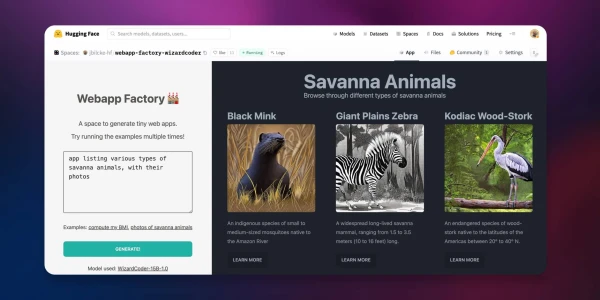
As more code generation models become publicly available, it is now possible to do text-to-web and even text-to-app in ways that we couldn't imagine before.
This tutorial presents a direct approach to AI web content generation by streaming and rendering the content all in one go.
Try the live demo here! → Webapp Factory
Using LLM in Node apps
While we usually think of Python for everything related to AI and ML, the web development community relies heavily on JavaScript and Node.
Here are some ways you can use large language models on this platform.
By running a model locally
Various approaches exist to run LLMs in JavaScript, from using ONNX to converting code to WASM and calling external processes written in other languages.
Some of those techniques are now available as ready-to-use NPM libraries:
- Using AI/ML libraries such as transformers.js (which supports code generation)
- Using dedicated LLM libraries such as llama-node (or web-llm for the browser)
- Using Python libraries through a bridge such as Pythonia
However, running large language models in such an environment can be pretty resource-intensive, especially if you are not able to use hardware acceleration.
By using an API
Today, various cloud providers propose commercial APIs to use language models. Here is the current Hugging Face offering:
The free Inference API to allow anyone to use small to medium-sized models from the community.
The more advanced and production-ready Inference Endpoints API for those who require larger models or custom inference code.
These two APIs can be used from Node using the Hugging Face Inference API library on NPM.
💡 Top performing models generally require a lot of memory (32 Gb, 64 Gb or more) and hardware acceleration to get good latency (see the benchmarks). But we are also seeing a trend of models shrinking in size while keeping relatively good results on some tasks, with requirements as low as 16 Gb or even 8 Gb of memory.
Architecture
We are going to use NodeJS to create our generative AI web server.
The model will be WizardCoder-15B running on the Inference Endpoints API, but feel free to try with another model and stack.
If you are interested in other solutions, here are some pointers to alternative implementations:
- Using the Inference API: code and space
- Using a Python module from Node: code and space
- Using llama-node (llama cpp): code
Initializing the project
First, we need to setup a new Node project (you can clone this template if you want to).
git clone https://github.com/jbilcke-hf/template-node-express tutorial
cd tutorial
nvm use
npm install
Then, we can install the Hugging Face Inference client:
npm install @huggingface/inference
And set it up in src/index.mts:
import { HfInference } from '@huggingface/inference'

// to keep your API token secure, in production you should use something like:
// const hfi = new HfInference(process.env.HF_API_TOKEN)
const hfi = new HfInference('** YOUR TOKEN **')
Configuring the Inference Endpoint
💡 Note: If you don't want to pay for an Endpoint instance to do this tutorial, you can skip this step and look at this free Inference API example instead. Please, note that this will only work with smaller models, which may not be as powerful.
To deploy a new Endpoint you can go to the Endpoint creation page.
You will have to select WizardCoder in the Model Repository dropdown and make sure that a GPU instance large enough is selected.
Once your endpoint is created, you can copy the URL from this page.
Configure the client to use it:
const hf = hfi.endpoint('** URL TO YOUR ENDPOINT **')
You can now tell the inference client to use our private endpoint and call our model:
const { generated_text } = await hf.textGeneration({
  inputs: 'a simple "hello world" html page: <html><body>'
});
Generating the HTML stream
It's now time to return some HTML to the client. The full code and further details are available in the original tutorial.