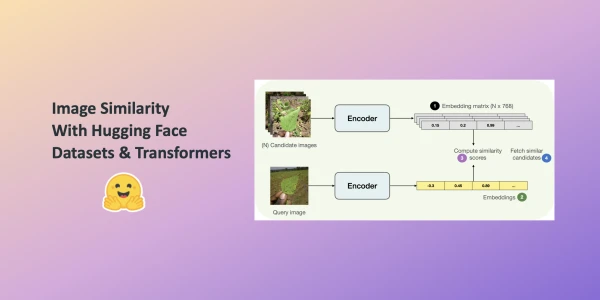
In this post, you'll learn to build an image similarity system with Hugging Face Transformers. Finding similarity between a query image and potential candidates is a key use case for information retrieval systems, such as reverse image search. The system answers the question: given a query image and a set of candidate images, which candidates are most similar to the query?
We leverage the Hugging Face datasets library, which seamlessly supports parallel processing, ideal for building this system. Although the example uses a ViT-based model (nateraw/vit-base-beans) and the Beans dataset, it can be extended to other vision models like Swin Transformer, ConvNeXT, or RegNet, and other image datasets.
How Do We Define Similarity?
The system computes dense representations (embeddings) of images and uses cosine similarity to measure similarity. Embeddings compress high-dimensional pixel space (e.g., 224x224x3) into a lower-dimensional vector (e.g., 768), reducing computation time.
Computing Embeddings
We use the AutoModel class to load a vision model that encodes images into embeddings. Alongside, we load the associated processor for data preprocessing.
from transformers import AutoImageProcessor, AutoModel

model_ckpt = "nateraw/vit-base-beans"
processor = AutoImageProcessor.from_pretrained(model_ckpt)
model = AutoModel.from_pretrained(model_ckpt)
We omit AutoModelForImageClassification because we want embeddings, not discrete categories. The model fine-tuned on the target dataset (Beans) provides better understanding than a generalist model. Self-supervised checkpoints can also yield impressive retrieval performance.
Loading a Dataset for Candidate Images
We build hash tables mapping candidate images to their embeddings. For demonstration, we use 100 samples from the Beans dataset's training split.
from datasets import load_dataset

dataset = load_dataset("beans")
num_samples = 100
seed = 42
candidate_subset = dataset["train"].shuffle(seed=seed).select(range(num_samples))
The Process of Finding Similar Images
The workflow consists of four steps:
- Extract embeddings from all candidate images, storing them in a matrix.
- Extract embeddings from the query image.
- Compute cosine similarity between the query embedding and each candidate embedding, maintaining a mapping of image identifiers to scores.
- Sort by similarity score and return the top candidates.
We define a utility function and map() it to the candidate dataset for efficient embedding computation.
import torch

def extract_embeddings(model: torch.nn.Module):
    """Utility to compute embeddings."""
    device = model.device

    def pp(batch):
        images = batch["image"]
        # Preprocessing transformations applied to input images
        # ...
    return pp
This approach can be extended to other modalities and datasets, offering a flexible foundation for building image similarity systems.