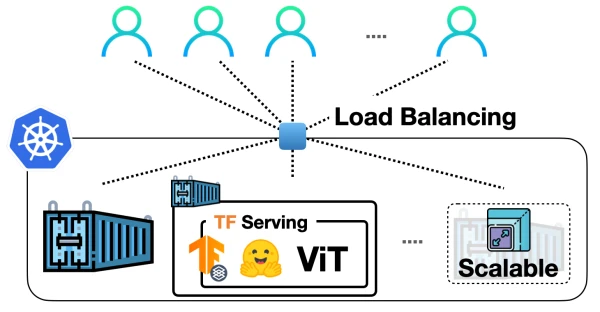
In a previous post, we demonstrated how to deploy a Vision Transformer (ViT) model from Hugging Face Transformers locally using TensorFlow Serving. Now, we take it to the next level by scaling that deployment with Docker and Kubernetes, enabling it to handle real-world traffic.
Why Docker and Kubernetes?
The standard workflow for scaling ML model deployments involves containerizing the application with Docker and orchestrating it with Kubernetes. This approach is battle-tested in the industry, offering granular control, autoscaling, and security. While services like SageMaker or Vertex AI simplify ML deployment, Docker and Kubernetes provide flexibility and are widely adopted.
This guide uses Google Kubernetes Engine (GKE) to provision a cluster, but the concepts apply to Minikube or other Kubernetes solutions.
Containerization with Docker
We start with a TensorFlow Serving model that accepts raw image bytes and handles preprocessing and postprocessing. The model must be stored in the SavedModel format and organized in the directory structure <MODEL_NAME>/<VERSION>/<SavedModel>.
Preparing the Docker Image
First, extract the SavedModel tarball into the correct directory:
MODEL_TAR=model.tar.gz
MODEL_NAME=hf-vit
MODEL_VERSION=1
MODEL_PATH=models/$MODEL_NAME/$MODEL_VERSION

mkdir -p $MODEL_PATH
tar -xvf $MODEL_TAR --directory $MODEL_PATH
The models directory will look like:
/models
/models/hf-vit
/models/hf-vit/1
/models/hf-vit/1/keras_metadata.pb
/models/hf-vit/1/variables
/models/hf-vit/1/variables/variables.index
/models/hf-vit/1/variables/variables.data-00000-of-00001
/models/hf-vit/1/assets
/models/hf-vit/1/saved_model.pb
Next, build a custom TensorFlow Serving image by copying the models into a running container:
docker run -d --name serving_base tensorflow/serving
docker cp models/ serving_base:/models/
After copying, commit the container to create a new image:
docker commit serving_base hf-vit-serving
docker rm serving_base
This image, hf-vit-serving, contains the model and is ready for deployment.
Running Locally
To test the image locally:
docker run -p 8501:8501 -t hf-vit-serving
The model will be available at http://localhost:8501/v1/models/hf-vit:predict.
Pushing to a Registry
For Kubernetes, push the image to a container registry like Docker Hub or Google Container Registry (GCR). For GCR:
docker tag hf-vit-serving gcr.io/[PROJECT_ID]/hf-vit-serving:latest
docker push gcr.io/[PROJECT_ID]/hf-vit-serving:latest
Deploying on Kubernetes
Provisioning a Cluster on GKE
Create a Kubernetes cluster using gcloud:
gcloud container clusters create tf-serving-cluster --num-nodes=3 --zone=us-central1-a
Get credentials:
gcloud container clusters get-credentials tf-serving-cluster --zone=us-central1-a
Writing Kubernetes Manifests
Create a deployment manifest deployment.yaml:
apiVersion: apps/v1
kind: Deployment
metadata:
  name: vit-deployment
spec:
  replicas: 3
  selector:
    matchLabels:
      app: vit-server
  template:
    metadata:
      labels:
        app: vit-server
    spec:
      containers:
      - name: vit-container
        image: gcr.io/[PROJECT_ID]/hf-vit-serving:latest
        ports:
        - containerPort: 8501
Then a service service.yaml to expose the deployment:
apiVersion: v1
kind: Service
metadata:
  name: vit-service
spec:
  type: LoadBalancer
  selector:
    app: vit-server
  ports:
  - port: 8501
    targetPort: 8501
Performing the Deployment
Apply the manifests:
kubectl apply -f deployment.yaml
kubectl apply -f service.yaml
Check the status:
kubectl get pods
kubectl get services
Wait for the external IP to be assigned to the service.
Testing the Endpoint
Once the service is up, test with a sample image:
curl -X POST http://[EXTERNAL_IP]:8501/v1/models/hf-vit:predict -H "Content-Type: application/json" -d '{"instances": [{"image": {"b64": "<base64_encoded_image>"}}]}'
Replace <base64_encoded_image> with a base64-encoded image string.
Notes on TF Serving Configurations
TensorFlow Serving supports multiple configurations, such as batching and model version control. For production, consider enabling batching to improve throughput:
docker run -p 8501:8501 -t hf-vit-serving --enable_batching=true
In Kubernetes, you can pass arguments via the args field in the container spec.
Conclusion
By containerizing the ViT model with Docker and deploying it on Kubernetes, you achieve a scalable, production-ready serving infrastructure. This approach is widely used in industry and provides fine-grained control over deployments. The same method can be applied to other TensorFlow Serving models.
Acknowledgment
This work builds on the previous post on deploying ViT with TensorFlow Serving. All code is available in the accompanying repository.